Get the app Map (opens in a new tab)List your business
For stores & pharmacies

What they’re looking for is on your shelf. Let them know

Your products, seen by people searching nearby

AurMap searches your products, not just your shop’s name, and sends the order straight to you.

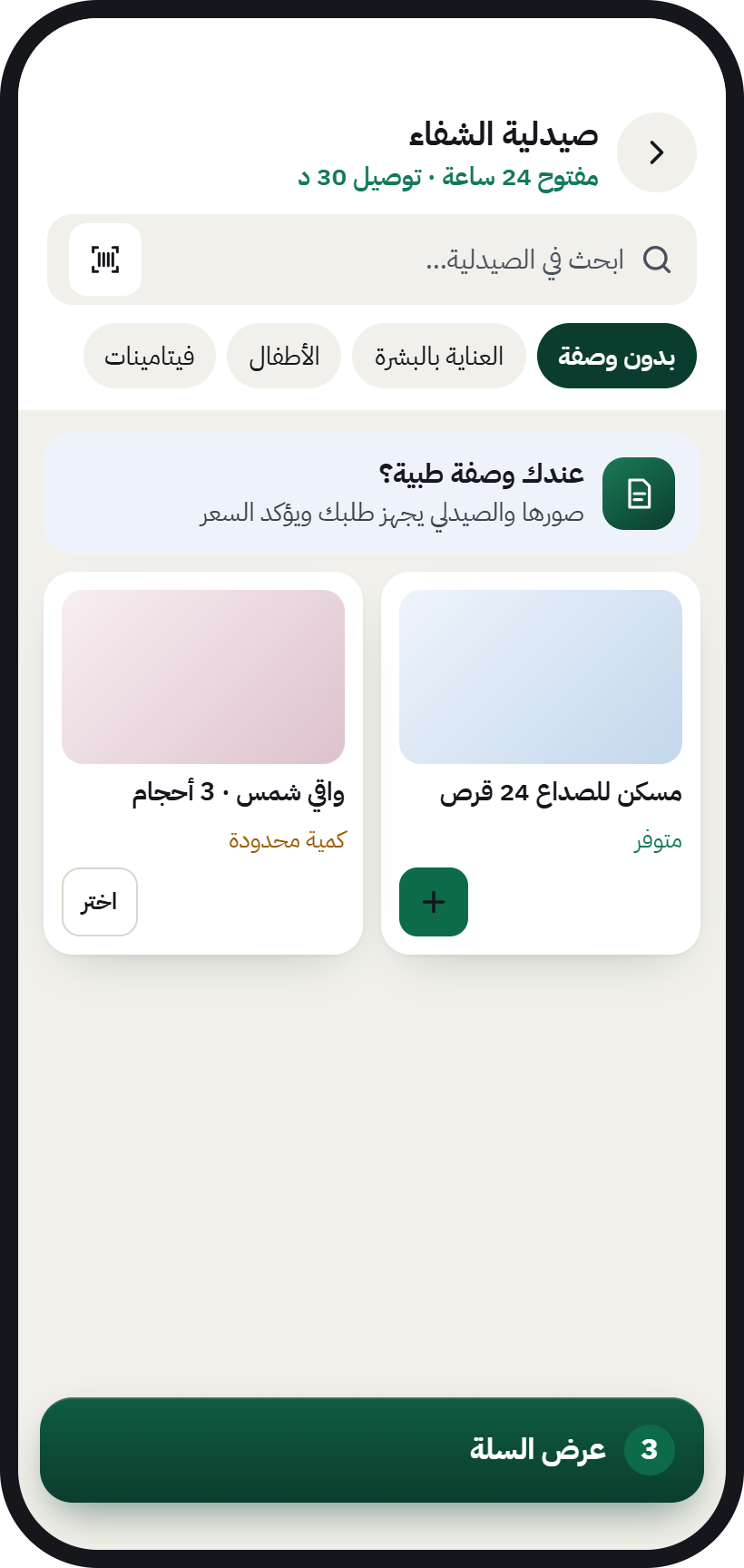
A pharmacy page in AurMap: search inside the pharmacy with a barcode scanner, prescription upload, and products in stock

AurMap for stores & pharmacies at a glance

Last updated:

What it is
AurMap searches the products of stores and pharmacies, not only the shop’s name.
Search
Customers on AurMap search for a product by text, voice or photo.
Barcode
Stores add their products on AurMap by scanning the barcode.
Prescriptions
Patients upload their prescription with a pharmacy order inside the AurMap app.
We know what wears you down

Full shelves, and the customer went elsewhere

  • They don’t know you have it

    They search for the product and go to the first place that comes up.

  • Prescriptions sent as WhatsApp photos

    Hard to follow up and match with the order.

  • Lots of products, tiring data entry

    You don’t have time to enter every item by hand.

For stores & pharmacies · In the same app

Every product on the shelf, visible on the map

  • Search by product

    Customers search by name, voice or photo, and find you.

  • Add by barcode

    Scan the barcode and add the product in seconds.

  • Prescription upload

    For pharmacies: patients upload the prescription with their order in the app.

  • Connect your online store

    Salla connection coming soon, so your products show without entering them twice.

Illustrative story11:00 pm

The neighbourhood pharmacy at 11 at night

Abu Omar owns a pharmacy in a residential neighbourhood. At 11 at night, Umm Rayan searches AurMap for a children’s fever reducer and takes a photo of the old box. Abu Omar’s pharmacy comes up as “Open now”, so she orders and uploads the prescription in the app. The pharmacist reviews the order and accepts it, and the order is ready.

An illustrative story to explain how it works, not a real customer’s experience.

Get your products seen
For shop owners New

Is your shop on the map? You can claim it yourself

Any shop on the map that hasn’t been registered by its owner shows “Waiting for its owner”. If it’s your shop, you can claim it and run it from your phone, in two ways:

  • Claim it yourself

    Open your shop’s page on the map and tap “Is this your shop? Claim it”. Sign in with your mobile number, enter your commercial registration details, and our team reviews them. Once it’s verified and paid for, your shop is in your name and you run it completely.

  • Or a member from your neighbourhood helps

    An AurMap member prepares the details for you and shows you a QR code. You scan it on your own phone, then review and confirm everything yourself. They never sign in to your account and never take any money from you.

  • You pay from your own phone, through a licensed payment gateway.
  • We never take cash or transfers, and members never handle money.
  • If verification doesn’t go through, you get a full refund.
List your business

List your store on the Golden Map

Sign up yourself in minutes, or leave your number and we will contact you.

Pick your plan and start now

Business Basic

Most chosen

45.75 SAR a month

Paid yearly: SAR 549, VAT included

Your whole plan for SAR 1.55 a day

Each extra employee: SAR 0.50 a day

  • 2 Digital Shop Cards
  • Products & Services Catalog
  • Customer Reviews & Ratings
  • Smart NFC Sticker Support
  • Opening Hours & Shop Page
Start with this plan

Business Pro

74.92 SAR a month

Paid yearly: SAR 899, VAT included

Your whole plan for SAR 2.50 a day

Each extra employee: SAR 0.50 a day

  • Everything in the basic plan
  • WhatsApp from your own number: campaigns, inbox and auto-reply
  • CRM Integration
  • Professional Visitor Analytics
  • 15 Sections / Departments
Start with this plan

Plans and payment are on AurCard, our business tools: one account with your mobile number.

  1. 1Pick your plan
  2. 2Sign up with your mobile number
  3. 3Pay and switch on your tools
Would you like us to contact you?
Mobile number

We use your details only to contact you about your request. Privacy policy (Arabic)

Before you sign up

Questions from business owners

All questions from business owners
How much does it cost to join?

The prices are above, under «Pick your plan»: VAT included and billed yearly. If you would like us to explain first, leave your number and we will contact you.

Do I need a separate app for my business?

No. Business tools are inside the AurMap app itself, and you reach them by switching accounts.

Who owns my customer data?

You do. On AurMap the customer deals with your business directly, you see your customers, and you can contact the ones who agreed.

Who can review my business?

Only customers who actually bought from you through AurMap. This protects you from random reviews.